Tampilkan postingan dengan label Video Editor. Tampilkan semua postingan

AVS Video Remaker 4.3 + Patch

Mau ngedit video tapi ga perlu ribet-ribet?
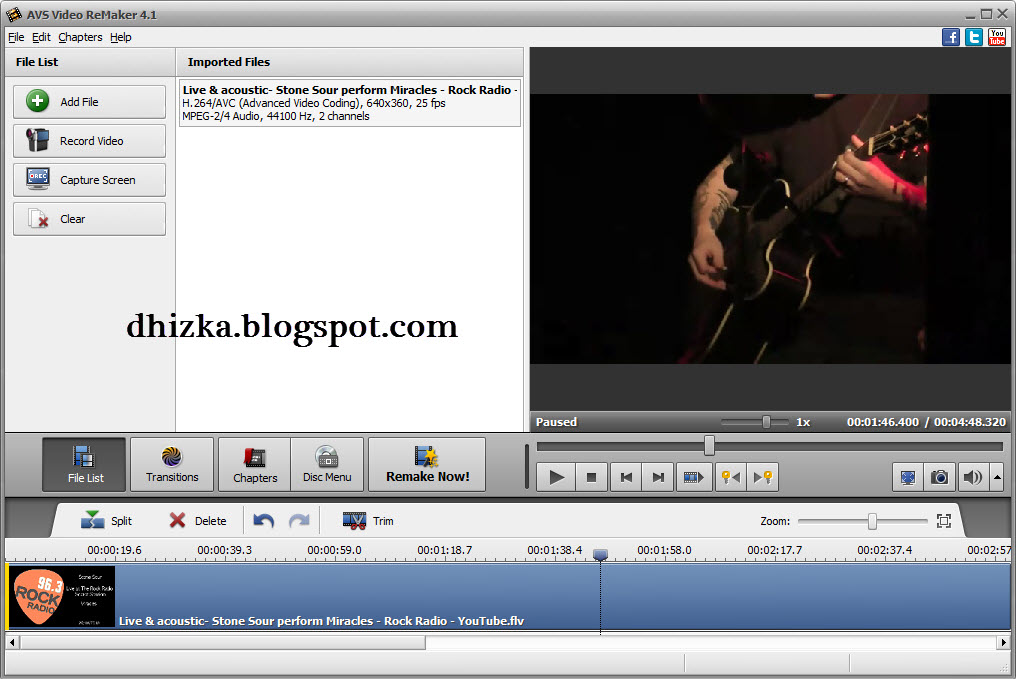
Kalo temen-temen ingin ngedit video seperti memotongnya, ataupun menambahkan efek transisi, pakai AVS Video Remaker 4.3 ini. Mudah untuk digunakan.
Selain itu pada AVS Video Remaker 4.3 ini terdapat menu Record Video dan juga Capture Screen. Buat temen-temen yang ada webcam nya bisa tuh ngerekam-rekam. Terus tinggal edit-edit deh.. hohohhoho

Keren deh, secara udah terkenal juga kan AVS ini.. hehehe
 

Edit Video Files without Reconversion
Cut, delete unwanted parts, change scene sequence in MPEG, AVI, DVD, Blu-ray, WMV, etc. with AVS Video ReMaker. Save videos without reconversion.
Work with Various Video Formats
Edit AVI, VOB, MP4, DVD, Blu-ray, WMV, 3GP, FLV, TS, DVR-MS, MOV, MKV, H.263/H.264 codecs, etc. See a full list of supported video formats
Edit HD-Videos
Edit AVCHD, MOD, MTS/M2TS, TOD, etc. video files recorded with camcorders and video cameras.
Create DVD and Blu-ray Menus
Split video into chapters, select between a number of menu templates. Burn video files on to DVD- or Blu-ray discs with AVS Video ReMaker.
Capture Video
Transfer video from camcorders and video cameras to hard drive, edit files and create home video DVDs with AVS Video ReMaker. Capture video from Web cameras and DV cameras.
Multilingual Support
AVS Video ReMaker interface and tech-support are available in English, French, German, Spanish, Italian, Japanese and Polish.

Minimum System Requirements

Processor:  Intel / AMD compatible at 1.86 GHz or higher
RAM:  1 GB or higher
Sound:  Windows compatible sound card
DirectX:  Microsoft DirectX 9.0c or later
Administrative permissions for program installation and activation
Internet connection to activate

Windows 8/Windows 7 Recommended System Requirements

Processor:  AMD / Intel Core 2 Duo compatible at 3 GHz or higher
RAM:  2 GB or higher
Video:  Windows 8/Windows 7 compatible video card
Sound:  Windows 8/Windows 7 compatible sound card

Note: System requirements may differ depending on the Windows 8/Windows 7 version installed and increase when Windows Aero interface is enabled.

Download :

Installer + Patch :
Download AVS Video Remaker 4.3 + Patch Via SB (41 MB)


Patch Only :
Download Patch AVS Video Remaker 4.3 Via TF (800 KB)

Tested by me (Windows 7 Ultimate 32-bit) Worked
Posted by Admin Okky


Video Editor adalah hal yang Sistem Komputer paparkan saat ini karena sangat menarik. Banyak hal yang mungkin bisa didapatkan dari tulisan tentang Video Editor ini.

MAGIX Movie Edit Pro MX Premium 11 + Keygen

Posting produknya orang Jerman lagi ahh.. hahhahah
3 hari yang lalu kan sudah posting MAGIX Mp3 Deluxe MX 18, sekarang posting MAGIX Movie Edit Pro MX Premium 11.. hehehhe
Dari namanya saja pasti temen-temen juga sudah tau kan apa guna nya ini software, jelas lah ya buat ngedit video. Feature lengkap, ga kalah sama SONY Vegas ataupun Adobe After Effect, interface seger diliat, elegan. Tapi yang
penting mah ngerti cara makai software nya sih ya.. -____-
Udah ayoo bagi yang suka edit-edit video langsung saja di cobaaa yaaa..


Show off your best footage!

Here at MAGIX we select the three of the best effect packages in the world for our Premium version every year. MAGIX Movie Edit Pro 2013 Premium provides you with a range of unique, high-quality plugins for professional video effects.
NewBlueFX Video Essentials IV allows you to make the impossible possible: Transform night into day, smooth skin tones and lots more. Create amazing, realistic particle simulations for your video sequences such as snow, smoke or rain with digieffects Phenomena. proDAD Adorage 13 features you with hundreds of special effects and transitions for creating impressive movies.

Your advantages:

  • High-quality special effects, cinematic transitions & templates
  • Full Stereo3D support (Import, edit, export)
  • Advanced dubbing: Dolby®Digital 5.1 mixer etc.
  • Full HD support for HDV and AVCHD camcorders
  • Video editing program with 99 tracks, multicam editing
  • Present your videos on TV, online or on the go

Exclusively in the Premium version:

Additional programs worth over £200*.
NEW! NewBlueFX Video Essential IV
Make the impossible possible: Transform night into day etc.
NEW! digieffects Phenomena
Create amazingly realistic particle simulations for your video sequences.
NEW! proDAD Adorage 13
Use hundreds of amazing video effects and transitions to create impressive movies and documentaries.

Supported operating systems

  • Microsoft® Windows® 8 (32-bit and 64-bit)
  • Microsoft® Windows® 7 (32-bit and 64-bit)
  • Microsoft® Windows® Vista© (32-bit and 64-bit)
  • Microsoft® Windows® XP (32-bit)

Minimum system requirements

All MAGIX programs are developed with user-friendliness in mind so that all the basic features run smoothly and can be fully controlled, even on low-performance computers. Check your operating system’s control panel for technical information about your computer.
  • Processor: Dual core processor with 2.0 GHz
  • RAM: 1 GB
  • Graphics card: Onboard graphics card with a minimum screen resolution of 1024 x 768
  • Sound card: Internal sound card
  • Hard disk memory: 2 GB free disk space for program installation
  • Optical drive: DVD drive (only for installing the box version)
Note: Vasco da Gama 6 requires an OpenGL 2.1 compatible graphics card.

Recommended System Requirements

Some advanced program functions demand more of your computer's processing power. To use these features fully, your system should at least meet the following recommended requirements. Check your operating system’s control panel for technical information about your computer.
System requirements for HD and Stereo3D editing
  • Processor: Intel® Core™ 2 Quad-core processor with 2.83 GHz (Intel® Core™ i7 recommended)
    or AMD® Quad-core processor with 2.8 GHz
  • RAM: 4 GB
  • Graphics card: Dedicated graphics card with 512 MB VRAM or more
  • For accelerated AVCHD output: NVIDIA® GeForce® 8000 Series and better (CUDA™) or AMD® Radeon™ 5000 Series
    and better (OpenCL™) or integrated graphics with Intel® Quick Sync Video
  • Sound card: Multi-channel sound card recommended for surround sound editing
  • Optical drive: Blu-ray burner for creating your own Blu-ray Discs™
System requirements for 3D playback
  • Red/cyan glasses required for anaglyph 3D display.
  • A special monitor is needed for viewing with polarized filter glasses.
  • A 120 Hz monitor or a projector as well as compatible shutter glasses and graphics card are required for shutter playback.

Supported file formats & devices

Supported import formats
  • Video: AVI, DV-AVI, MPEG-1, MPEG-2, MPEG-4, MTS, M2TS, MXV, MJPEG, QuickTime®, WMV(HD), VOB, MKV
  • Audio: WAV, MP3, OGG, WMA, MIDI, Dolby®Digital Stereo/5.1 (downmix to stereo)
  • Images: JPEG, BMP, GIF, TIF, TGA
Supported export formats
  • Video: AVI, DV-AVI, MJPEG, MPEG-1, MPEG-2, MPEG-4, QuickTime®, WMV(HD)
  • Audio: WAV, MP3
  • Images: JPEG, BMP
Supported devices
  • FireWire interface: for use with DV/HDV camcorders
  • USB interface: for use with HD camcorders, cameras, digital video recorders and webcams
  • Video, TV, or graphics cards with a video input for digitizing analog sources
  • Optical drives: Blu-ray, DVD-R/RW, DVD+R/RW, DVD-RAM, or CD-R/RW burner
** 98 test wins refers to the following versions of MAGIX Movie Edit Pro (Plus and Premium): 18, 17, 16, 15, 2007/2008, 2007, 2006/2007, 2006, 2005/2006, 2005, 2004/2005, 2004, 2003/2004, 2.0. Test wins from other countries refer to the country-specific version.
Note: Online services offered in the program and the online update feature require an Internet connection.
For copyright reasons MPEG-4, MPEG-2 and Dolby®Digital Stereo must first be activated for free.
Windows Media® Player version 10 or higher must be installed in order to export MP3s.

Download :
Installer + Keygen :
Download MAGIX Movie Edit Pro MX Premium 11 + Keygen Via MF (324 MB)
Part 1 | Part 2

[MIRROR]  Download MAGIX Movie Edit Pro MX Premium 11 + Keygen Via SB (324 MB)
Part 1 | Part 2

Keygen Only :
Download Keygen MAGIX Movie Edit Pro MX Premium 11 Via MF (5 MB)

CARA INSTALL DAN AKTIVASI

- MATIKAN KONEKSI INTERNET

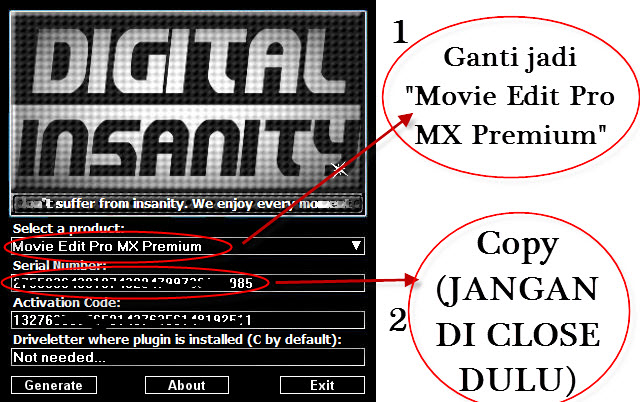
- Install MAGIX Movie Edit Pro MX Premium 11 nya - Ketika proses penginstallan sudah selesai, Jangan buka dulu MAGIX Movie Edit Pro MX Premium 11 nya, extract "OBATMMEPMXP", lalu copy "magic" ke ("C:\Program Files\MAGIX\Movie_Edit_Pro_MX_Premium_Download_Version\") - Lalu buka MAGIX Movie Edit Pro MX Premium 11 nya, lalu akan diminta untuk aktivasi seperti gambar dibawah, masukkan Serial Numbernya yang temen-temen bisa dapat dari Keygen, Lalu pilih "Activate Program by Post/Fax".. (JANGAN DI CLOSE DULU KEYGENNYA)
- Lalu pilih "Enter Activation Code"
- Copy Activation Code dari Keygen
- Lalu paste, lalu pilih "Unlock Program"
- SUCCESSSSSSS
GRATIS BUTUH PERJUANGAN

Tested by me (Windows 7 Ultimate 32-bit) Worked
Posted by Admin Okky
Video Editor adalah hal yang Sistem Komputer paparkan saat ini karena sangat menarik. Banyak hal yang mungkin bisa didapatkan dari tulisan tentang Video Editor ini.

Ashampoo Snap 6 + dll Crack File

Jika dulu dhizka sudah pernah posting Ashampoo Snap 4.3, lalu Ashampoo Snap 5, sekarang saatnya untuk posting yang terbarunya yaitu Ashampoo Snap 6 ini..
Bagi temen-temen dhizka yang belum tahu, Ashampoo Snap 6 ini adalah sebuah software yang bisa gunakan untuk meng-capture yang ada di tampilan layar komputer kita.
Bukan hanya gambar saja temen-temen !

Tapi juga bisa mengambil video, seru kan pasti? ehehehe bisa untuk membuat tutorial.. :D
Langsung sajalah...


It couldn’t be easier!

Whether it’s at work, at school, at home or anywhere else, making screenshots has become an everyday task. With Ashampoo Snap 6 perfect screenshots for presentations, manuals or the Internet are made in a jiffy.

Many new functions and more comfort

Thanks to many new functions it has never been easier to make and edit professional looking screenshots. Let yourself be inspired by new innovative tools and individually edit your screenshots and videos. Even capturing menu trees is now very easy! The menu capture mode enables the user to quickly make a snapshot of multi-level menus.

Online in no time

Our screen photographer is now also an absolute must-have for Facebook fans. The new export feature enables uploads to the social network. Just make a snapshot of the desired content, upload the result to Facebook and look forward to great comments and lots of likes. That’s it!

New perspectives for video recording

This indispensable tool for every computer user also provides new opportunities for recording videos. Ashampoo Snap 6 does not only record your desktop, but also your webcam with mike to create video greetings, for example. Furthermore, video greetings or other captures are now easily uploaded to YouTube from within the program.

New highlights

  • Restructured tool bars for improved workflow
  • New tools, e.g. Floodfill, BlurPen, Numbering etc.
  • Facebook and YouTube upload
  • Easier accessible configuration options for all tools
  • Improved tools supporting rotation and transparency
  • Delayed and timed capture
  • Menu capture mode for multi-level menus
  • Watermarking for screenshots and captured videos
  • Recording of webcam and microphone

Just show it!

Ashampoo Snap 6 will revolutionize the way you make, edit and share snaps and videos of your screen content!
This program allows you to easily take screenshots of various regions, websites, or even specific windows on your desktop with just a few clicks.
In the user-friendly editing mode several tools are available for editing. Using those it’s easy to add images, notes, texts, markings, watermarks etc. to your screenshots.
Saving or exporting screenshots and videos is quickly done within the program. Just send an email, save your result to the clipboard or a file or just print it. Moreover, you can now upload your result directly to Facebook or YouTube.

Capture mode: New features and improvements

  • “Fixed Size Capture” now offers different pre-defined screen sizes.
  • Both delayed and timed capture is supported and the user can decide between one-time or repeated capture of the screen.
  • Menu capture mode for capturing multi-level menus.
  • Adding watermarks automatically to screenshots and videos.
  • Recording of webcam and microphone and saving that as a video file.
  • Additional support to resize the captured videos in real-time. For example, while capturing the whole desktop, the captured video resolution can be shrunk to 75% of its original size.

Editing mode: New features and improvements

  • Restructured toolbars to ease usage and improve workflow.
  • Easier accessible options for all tools.
  • Improved support of rotation, transparency and optimized display.
  • Display of miniatures for multiple captures.
  • New option to stay with the current tool, for example to add arrows in a batch.
  • Facebook and YouTube upload directly from within the program.

Editing mode: New tools

  • Floodfill: Supports gradient fill and different fill styles.
  • Note: Easily add notes with a single click in order to describe captures.
  • Text: Supports gradients, outlines, mirror effects for the creation of more complex text objects.
  • Numbering: Automatically numbers areas of the capture with a single mouse click by creating small numbered bullets.
  • BlurPen: This pen can be used to easily blur or pixelate areas of a screenshot.

Further improvements

  • Restructured configuration dialogues.
  • New Filename Generator: Automatically adds the title of the captured window or website to the filename.
  • Improved touch screen support for Windows 7.

Requirements
Operating System:
Windows® XP, Windows Vista®, Windows® 7, Windows® 8
Computer:
Any computer that runs on one of the above operating systems at a reasonable speed.
Graphic adapter:
min.resolution1024 x 768 and 16-bit High color (32-bit recommended) and min. 64 MB RAM.
Sound Card:
none (supported audio record device and microphone recommended)
RAM and disk space:
256 MB RAM, approx. 30 MB Hard Disk Space for program files.


Download :
Installer + dll Crack File :
Download Ashampoo Snap 6 + dll Crack File Via IDWS (29 MB)
Password
Harus Diketik
 
dll Crack File Only :
Download dll Crack File Ashampoo Snap 6 Via IDWS (1 MB)


Tested by me (Windows 7 Ultimate 32-bit) Worked
Posted by Admin Okky
Video Editor adalah hal yang Sistem Komputer paparkan saat ini karena sangat menarik. Banyak hal yang mungkin bisa didapatkan dari tulisan tentang Video Editor ini.

Adobe CS6 Master Collection + dll Crack Files

Yaap akhirnya dhizka bisa juga mem-posting ini.. hohoohoh
Yaaah siapa lagi gitu yang masih ga kenal sama software ini. Didalemnya sudah lengkap dari photoshop, illustrator ataupun after effect.
Pada versi CS6 ini semua produk adobe memiliki perubahan pada tampilan, jadi hitam, lebih elegan, dan keren.. hohoohohh
Dan yang dhizka rasakan entah kenapa versi CS6 ini lebih ringan dibanding CS5. Ah yang
penting sih ini lebih keren dan update aja gitu, belum banyak orang juga yang pakai ini, jadi kalo dilihat orang kan keren.. hahahaha
Ini installer package temen-temen, jadi temen-temen bisa memilih produk adobe mana saja yang diinstall ataupun tidak di install..
Oke langsung sajaa.. :)


System requirements

Windows

Intel® Pentium® 4 or AMD Athlon® 64 processor
Microsoft® Windows® XP* with Service Pack 3 or Windows 7 with Service Pack 1
2GB of RAM (3GB recommended) for 32 bit; 2GB of RAM (8GB recommended) for 64 bit
11GB of available hard-disk space for installation; additional free space required
during installation (cannot install on removable flash storage devices)
1280x800 display (1280x1024 recommended) with 16-bit color and 512MB of VRAM
OpenGL 2.0–capable system
DVD-ROM drive compatible with dual-layer DVDs
Java™ Runtime Environment 1.6 (included)
QuickTime 7.6.6 software required for HTML5 media playback and multimedia features
Adobe® Flash® Player 10 software required to export SWF files
This software will not operate without activation. Broadband Internet connection and registration are required for software activation, validation of subscriptions, and access to online services.† Phone activation is not available.


Download :
Dowload Adobe CS6 Master Collection + dll Crack Files Via MF (6,94 GB) :
Part 1 | Part 2 | Part 3 | Part 4 | Part 5 | Part 6  | Part 7
Part 8 | Part 9 | Part 10 | Part 11 | Part 12 | Part 13 | Part 14
Part 15 | Part 16 | Part 17 | Part 18 | Part 19 | Part 20 | Part 21
Part 22 | Part 23 | Part 24 | Part 25 | Part 26 | Part 27 | Part 28
Part 29 | Part 30 | Part 31 | Part 32 | Part 33 | Part 34 | Part 35
Password
Harus Diketik


Tested by me (Windows 7 Ultimate 32-bit) Worked
Posted by Admin Okky


Video Editor adalah hal yang Sistem Komputer paparkan saat ini karena sangat menarik. Banyak hal yang mungkin bisa didapatkan dari tulisan tentang Video Editor ini.

Aiseesoft 3D Converter 6.3.6 + Keygen

Buat video 2D menjadi 3D !!!
Yaap dengan Aiseesoft 3D Converter 6.3.6 ini kita dapat merubah sebuah video yang berpenampilan standart menjadi 3D. Sebaliknya juga, dengan Aiseesoft 3D Converter 6.3.6 ini kita dapat merubah video/film yang 3D menjadi biasa atau 2D.
dhizka juga baru tau nih temen-temen kalau 3D itu sebenernya ada tambahan efek warna pada video tersebut, nah dalam
Aiseesoft 3D Converter 6.3.6 ini pun kita bisa memilih efek warnanya, seperti Red/Cyan, Green/Magenta, dll. Dan yang jelas bener-bener jadi 3D, tapi percuma juga kalau ga punya kaca matanya.. hwahhahhahah
Ayoo temen-temen dicobaaaaa.


Aiseesoft 3D Converter, the most professional and easy-to-use 3D Video Converter, can convert general 2D and 3D video files. This software allows users to convert 2D videos to 3D files, convert 3D videos to 2D. Also this software enables users to convert 3D videos to other 3D modes.
This 3D Converter offers users several 3D modes - Anaglyph 3D, Side by Side 3D, and Top and Bottom 3D. And it supports most popular video formats, like MP4, H.264, AVI, WMV, FLV, MKV, 3GP, MOV, RM, RMVB, etc.
  • Convert 2D to 3D videos
  • Convert 3D files to 2D and other 3D videos
  • Support Anaglyph 3D, Side by Side 3D, and Top and Bottom 3D
  • Support popular standard video formats
System Requirements Windows 7, Windows Vista, Windows XP (SP2 or later); 800MHz Intel/AMD CPU or above; 512MB RAM or more


Download :


Installer + Keygen :
Download Aiseesoft 3D Converter 6.3.6 + Keygen Via MF (21 MB)
Password
Harus Diketik
 
Keygen Only :
Download Keygen Aiseesoft 3D Converter 6.3.6 Via MF (50 KB)


Tested by me (Windows 7 Ultimate 32-bit) Worked
Posted by Admin Okky
Video Editor adalah hal yang Sistem Komputer paparkan saat ini karena sangat menarik. Banyak hal yang mungkin bisa didapatkan dari tulisan tentang Video Editor ini.

Photodex ProShow Producer 5.0.3222 + Patch

Wiiw software keren nih temen-temen... Dengan Photodex ProShow Producer 5.0.3222 ini kita bisa membuat animasi foto, seperti slideshow, namun ini versi kerennya.  Dan yang bikin dhizka suka adalah ini praktis banget banget banget temen-temen, cukup dengan 3 langkah saja, memilih foto-foto nya, memilih latar musiknya, lalu memilih memakai animasi yang mana saja, dan pilihan animasinya itu banyak sekali
temen-temen dan kita juga bisa memakai semuanya.  Cocok banget nih temen-temen jika kita ingin membuat album foto yang bisa dilihat rame-rame.. hohoho Ayoo temen-temen, dicoba dulu, baru kerasa.. hehehhe


ProShow Producer will run on most modern Windows systems. As with any multimedia software, the performance you see in ProShow will depend on your system.

Minimum Requirements:
  • Windows XP, Vista or 7
  • 1024 x 768 display
  • 1GHz+ processor
  • 1GB system memory; (2 GB recommended)
  • Accelerated 3D graphics – 64MB ram
  • DirectX 8.0 or better
  • DVD+R/RW/-R/RW writer
  • 70 MB hard drive space
64-bit installations of Windows are supported, although ProShow is not a 64-bit application so it will not take full advantage of  a 64-bit platform.
Recommended:
  • Windows 7
  • 1920 x 1080 display
  • 2Ghz, dual-core processor or better
  • 4GB system memory or more
  • Accelerated 3D graphics – 512MB ram or higher
  • DirectX 9.0 or better
Optional Requirements:
For Blu-ray output, a Blu-ray writer is required. Additional RAM and free hard drive space is also recommended.

Supported Media Types:
DVD+R, DVD+RW, DVD+R DL, DVD-R, DVD-RW,
DVD-R DL, CD-R, CD-RW, BD-R, BD-RE


Download : Installer + Patch : 
Download Photodex ProShow Producer 5.0.3222 + Patch Via MF (38 MB)Password
Harus Diketik


Patch Only :
Download Patch Photodex ProShow Producer 5.0.3222 Via MF (1 MB)


Tested by me (Windows 7 Ultimate 32-bit) Worked
Posted by Admin Okky

Video Editor adalah hal yang Sistem Komputer paparkan saat ini karena sangat menarik. Banyak hal yang mungkin bisa didapatkan dari tulisan tentang Video Editor ini.

VideoCharge Studio 2.10 Incl Crack

Mmmm VideoCharge Studio 2.10 ini mungkin bisa menjadi pilihan bagi temen-temen yang suka dalam mengedit video.
VideoCharge Studio 2.10 ini kegunaannya banyak sekali temen-temen, seperti membuat video internet galleries, meng-convert video, split Video, add watermark pada video atau photo (Menambahkan logo ke Video dan Photo)
, meng-embed gambar ke video, membuat video dari beberapa gambar, editing audio dll.
Pada kenyataan banyak yang menggunakan VideoCharge Studio 2.10 untuk me-Watermark Video atau foto.
Cocok banget nih buat temen-temen yang ingin menambahkan sesuatu di sebuah video, biar lebih eksis.. whahahahhaha
Cekidooot temen-temen....


dhizka nyoba Watermark Video nih temen-temen..


 Begini deh jadinya..


Feature :
Main
The general functions of the software. Everything about video coding, working with files, creating thumbnails, description of the general functions.

Watermarking
Everything about adding watermark to video file or image. Application of the effects. Setupping the time of displaying watermark in the video. Working with animation.

Image editing
Everything about abilities of editing the video frame or image. Blurring of the areas. Deleting of watermarks.

Video editing
Everything about video editing. Video splitting, merging, inserting of scenes, audio editing.

WEB
Some abilities of HTML pages creation for created video files. And additional abilities: working through command line, interface.
Platform: Windows ME, Windows NT 4.0, Windows 2000, Windows XP, Windows Vista, Windows 7  


Download :
Password
Harus Diketik


Tested by me (Windows 7 Ultimate 32-bit) Worked
Posted by Admin Okky
Video Editor adalah hal yang Sistem Komputer paparkan saat ini karena sangat menarik. Banyak hal yang mungkin bisa didapatkan dari tulisan tentang Video Editor ini.

Adobe CS5 Master Collection + dll crack files

PhotobucketHaddeehhh akhirnya selesai juga nih upload nya.. hehehhehee
Hayooo siapa yang ga kenal dengan produser software sebesar diaa ini? hihiheeie
Karena banyak yang request Adobe After Effect, sekalian aja deh nih dhizka kasih Adobe CS5 Master Collection , didalamnya sudah terdapat semua produk Adobe dari Photosop sampai After Effet dan
Fireworks.
Temen-temen tinggal pilih aja yang mana yang ingin di install.. ehehehhe
Tapi harus disesuaikan juga yaa dengan system requirements nya masing-masing.. hehehhe
Tetapi jika memang system requirements tidak memadai kita juga tidak bisa menginstall salah satu dari produk adobe tersebut, seperti laptop dhizka yang tidak bisa di install Adobe After Effects CS5 karena spek tidak memadai. -_____-

Photobucket
Photobucket


Features? Langsung ke homepage nya aja yaaa.. Banyak banget soalnya.. ehhehehe


Download
Download ISO Adobe CS5 Master Collection + dll crack files Via MF (5,6 GB)
Password
Harus Diketik


TUTORIAL CARA INSTALL, READ THIS

KLIK GAMBAR UNTUK MEMPERBESAR

1. MATIKAN KONEKSI INTERNET

2. Ekstrak semua file RAR nya yang ada 29 itu, belum tau cara menggabungkan files? Lihat disini.

3. Akan keluar 1 files ISO, yaitu "Adobe Creative Suite 5.5 Master Collection.iso".. Mount files tersebut. Belum tau cara mount file ISO? Lihat disini.

4. Yaaap buka drive yang telah di mount, lalu pilih "Set up"

5. Accept

6. Pilih "Install this product as a trial", lalu pilih language nya, lalu pilih next..

7. Pilih program Adobe apa saja yang ingin di install, hilangkan centang jika tidak ingin menginstall program tersebut, kalau sudah pilih "INSTALL"

8. Tunggu proses install, sabaar yaaaa.....

9. Proses install selesaiiiiiii... "Next"

10. "Done"

11. Buka ke drive yang di mount tadi, lalu pilih folder "Crack - Serial - Keygen - Info"

12. Lalu pilih folder DLL Files

13. Lalu pilih folder 32 bit atau 64 bit tergantung PC temen-temen

14. Copy "amtlib.dll"

15. Lalu copy "amtlib.dll" tersebut ke :

32bit apps;
Untuk Adobe Audition CS5.5
C:\Program Files (x86)\Adobe\Adobe Audition CS5.5\ atau
C:\Program Files\Adobe\Adobe Audition CS5.5\

Untuk Adobe Contribute CS5.1
C:\Program Files (x86)\Adobe\Adobe Contribute CS5.1\ atau
C:\Program Files\Adobe\Adobe Contribute CS5.1\

Untuk Adobe Dreamweaver CS5.5
C:\Program Files (x86)\Adobe\Adobe Dreamweaver CS5.5\ atau
C:\Program Files\Adobe\Adobe Dreamweaver CS5.5\

Untuk Adobe Encore CS5.1
C:\Program Files (x86)\Adobe\Adobe Encore CS5.1\ atau
C:\Program Files\Adobe\Adobe Encore CS5.1\
Untuk Adobe Fireworks CS5.1
C:\Program Files (x86)\Adobe\Adobe Fireworks CS5.1\ atau
C:\Program Files\Adobe\Adobe Fireworks CS5.1\

Untuk Adobe Flash Catalyst CS5.5
C:\Program Files (x86)\Adobe\Adobe Flash Catalyst CS5.5\ atau
C:\Program Files\Adobe\Adobe Flash Catalyst CS5.5\

Untuk Adobe Illustrator CS5.1
C:\Program Files (x86)\Adobe\Adobe Illustrator CS5.1\Support Files\Contents\Windows\ atau
C:\Program Files\Adobe\Adobe Illustrator CS5.1\Support Files\Contents\Windows\

Untuk Adobe InDesign CS5.5
C:\Program Files (x86)\Adobe\Adobe InDesign CS5.5\ atau
C:\Program Files\Adobe\Adobe InDesign CS5.5\

Untuk Adobe OnLocation CS5.1
C:\Program Files (x86)\Adobe\Adobe OnLocation CS5.1\ atau
C:\Program Files\Adobe\Adobe OnLocation CS5.1\

Untuk Adobe Photoshop CS5.1
C:\Program Files (x86)\Adobe\Adobe Photoshop CS5.1\ atau
C:\Program Files\Adobe\Adobe Photoshop CS5.1\


64bit apps;
Untuk Adobe After Effects CS5.5
C:\Program Files\Adobe\Adobe After Effects CS5.5\Support Files\
Untuk Adobe Media Encoder CS5.5
C:\Program Files\Adobe\Adobe Media Encoder CS5.5\

Untuk Adobe Photoshop CS5.1 (64 Bit)
C:\Program Files\Adobe\Adobe Photoshop CS5.1 (64 Bit)\

Untuk Adobe Premiere Pro CS5.5
C:\Program Files\Adobe\Adobe Premiere Pro CS5.5\

Maksudnya, misal temen-temen hanya menginstall Illustrator dan InDesign, temen-temen harus meng-copy dll files nya seperti tujuan diatas yang untuk Adobe Illustrator CS5.1 dan untuk Adobe InDesign CS5.5, jadi dengan kata lain temen-temen harus 2 kali meng-copy "amtlib.dll" nya, satu untuk Illustrator, satu untuk InDesign. Jadi semakin banyak Program yang temen-temen install, semakin banyak juga "amtlib.dll" nya harus di copy.. hehehhe

16. REPLACE/OVERWRITE


GRATIS BUTUH PERJUANGAAAAN.. HAHHHAHAHAHAH


Tested by me (Windows 7 Ultimate 32-bit) Workeeeeeed !!!
Posted by Admin Okky


Video Editor adalah hal yang Sistem Komputer paparkan saat ini karena sangat menarik. Banyak hal yang mungkin bisa didapatkan dari tulisan tentang Video Editor ini.

Boilsoft Video Joiner 6.57 + Serial

Mau posting lagii ahh.. Tentang video lagi nih..
Kalau barusan dhizka memposting Aiseesoft Total Video Converter Platinum v6.3.6 untuk meg-convert video, kalau sekarang dhizka akan memposting Boilsoft Video Joiner 6.57 yang dimana memiliki kegunaan untuk menggabungkan video.
Bener-bener praktis temen-temen, kita tinggal membuka file-file video yang ingin
kita gabungkan menjadi 1 video, lalu tinggal klik "merge", tunggu proses.. Jadiiii deh..
Whahhaah.. Termasuk software Video Editor juga nih temen-temen.. Mariii...


Features
  • Direct Stream Clone Mode joins same type files in super speed.
  • Re-encode Mode joins any different format files as you like.
  • Without installing avi codec, the AVI files can be also joined in Direct Mode!
  • Support join AVI, DivX, MPEG-4 files.
  • Support join MPEG-1 and MPEG-2 video files.
  • Support join VOB video files.
  • Support join RM, RMVB files.
  • Support join ASF, WMV, WMA files
  • Support join 3GP(.3gp, .3g2) files
  • Support join MP4(.mp4, .m4a, .m4v) files
  • Support join MKV files.
  • Support join FLV, MTS files in Re-encode Mode.
  • Support join MPEG Audio and Windows Media Audio.
  • Join video files as many as you want.
  • Scramble and rearrange the video clips in the sequence that you exactly desire.
  • Very User-friendly interface.
 Requirements:
  • Microsoft DirectX 8.1 or later runtime
  • Microsoft Windows 98/ME/2000/XP/2003/ Windows Vista/ Windows 7 

Download :


Installer + Serial :
Download Boilsoft Video Joiner 6.57 + Serial Via MF (10 MB)
Password
Harus Diketik


Serial Only :
Download Serial Boilsoft Video Joiner 6.57 Via MF (258 KB)


Tested by me (Windows 7 Ultimate 32-bit) Worked
Posted by Admin Okky


Video Editor adalah hal yang Sistem Komputer paparkan saat ini karena sangat menarik. Banyak hal yang mungkin bisa didapatkan dari tulisan tentang Video Editor ini.

Nero 11.0.15800 Full Repack

Wihiw pasti udah pada ga asing kan ya dengan Nero ini..
Pasti kalau temen-temen denger nero yang pertama ada dipikiran temen-temen sebuah software burning yaa??
Memang sih Nero ini merupakan bisa dibilang burning CD/DVD terbaik, namun yang dhizka share disini merupakan 1 paket semua produk Nero, terdiri dari Nero Burning ROM, Nero Express, Nero
BackIt Up, Nero Cover Designer, Nero Recode, Nero Kwik Media, Nero Wave Editor, dll masih banyak lagi.. capee.. -.-
Jadi bener-bener hampir mencakup semua label yang ada di dhizka nih temen-temen, dari CD/DVD Tools, Multimedia, dll..
Tapi jangan khawatir juga temen-temen, sebelum menginstall temen-temen juga bisa milih kok mau menginstall yang mana ajaa.. :)


SYSTEM REQUIREMENTS,FEATURES & INFORMATION

Minimum system requirements for Nero 11
  • ­­Windows® XP SP3 (32bit), Windows Vista® SP1 or later (32 and 64bit), Windows® 7 Home Premium, Professional or Ultimate (32 and 64bit)
  • 2 GHz AMD or Intel® processor
  • 512 MB RAM (1 GB RAM for Windows Vista® or Windows® 7)
  • 5 GB hard drive space for a typical installation of all components (including templates, content and temporary disk space)
  • Microsoft® DirectX® 9.0 compliant graphics card with 3D acceleration, 16-bit color, and a minimum of 128 MB video memory is required (32-bit, true color, 256 MB dedicated video RAM, and support for Shader Model 3.0 is recommended)
  • DVD disc drive for installation and playback
  • CD, DVD, or Blu-ray Disc recordable or rewritable drive for burning and video authoring
  • Windows Media® Player 9
  • Third party components such as Microsoft Windows® Installer 4.5, Microsoft .NET® 4, Microsoft® DirectX® or Adobe Flash are shipped with the product or automated download if not included in the package
  • For some services an Internet connection is required (DSL-1000 and higher recommended). Internet connection charges are the user's responsibility

Note:
  • ­On 64-bit operating systems, applications run in 32-bit emulation mode
  • The devices must be correctly installed and recognized by the operating system for the product to work properly
  • Installation of the latest WHQL certified device drivers is strongly recommended

Special / Minimum requirements for video editing and authoring
  • ­OHCI compliant FireWire® controller (IEEE® 1394) for DV or HDV™ capturing
  • TV tuner or video capture card for analog and digital video recording
  • Up to 50 GB hard drive space for disk images and temporary files
  • For support of NVIDIA® CUDA™, AMD App Acceleration or Intel® Media SDK technologies a capable graphics card must be installed and a minimum of 256 MB video memory is required.

Special / Minimum requirements for working with high-definition video content
  • Intel® or AMD dual core processor with at least 2 GHz
  • 2 GB of RAM
  • For support of NVIDIA® CUDA™, AMD App Acceleration or Intel® Media SDK technologies a capable graphics card must be installed and a minimum of 256 MB video memory is required.
    For playback of copy-protected video content, an appropriate hardware/software setup is required

Special / Minimum requirements for backup
  • ­Broadband Internet access is required for backups to Nero Online Backup

Special / Minimum requirements for LightScribe and Labelflash™
  • ­LightScribe compatible recorder and medium.
  • LightScribe host software must be installed.
  • Labelflash™ compatible recorder and medium. 

Supported media for burning
  • ­­CD-R
  • CD-RW
  • DVD±R
  • DVD±RW
  • DVD-RAM
  • DVD±R DL
  • BD-R
  • BD-RE
  • BD-R DL
  • BD-RE DL
  • BD-R TL (BDXL)
  • BD-RE TL (BDXL)
  • BD-R QL (BDXL)
  • BD-RE QL (BDXL)

Supported disc formats
  • ­Data CD (ISO, UDF, ISO/UDF)
  • Data DVD (ISO, UDF, ISO/UDF)
  • Blu-ray data disc (ISO, UDF)
  • SecurDisc CD/DVD/Blu-ray Disc
  • Nero DiscSpan (UDF)
  • Audio CD
  • Mixed Mode CD
  • CD EXTRA
  • Nero Image (NRG)
  • CUE-Image [Import only]
  • ISO Image
  • Video CD
  • Super Video CD
  • DVD-Video
  • DVD+VR
  • DVD-VFR
  • DVD-VR [Import only]
  • AVCHD™ video
  • BDMV video
  • BDAV [Import only]

Supported audio formats and codecs
  • ­Advanced Audio Coding elementary stream (AAC) - not ripping
  • Audio Interchange File Format (AIFF, AIF)
  • Compact Disc Digital Audio (CDA) - not encoding
  • Dolby® Digital (AC3)
  • Moving Picture Experts Group Audio Layer 3 (MP3 / mp3PRO )
  • MPEG-4 Audio (MP4, M4A)
  • Ogg Vorbis (OGG, OGM, OGA)
  • PCM WAV file, ADPCM Wav file (WAV, WAVE)
  • Windows Media™ Audio (WMA)
  • Free Lossless Audio Codec (FLAC)
  • MPEG Audio (MP2, MP2A, MPA, MPA2, M2A)
  • Monkey’s audio (APE)
  • Matroska audio (MKA)

Supported video formats and codecs
  • ­Advanced Streaming Format (ASF)
  • Audio Video Interleave (AVI, NVAVI)
  • Digital Video (DV, DVSD)
  • QuickTime® Movie (MOV)
  • DVD Video Object (VOB)
  • MPEG Video (MPG, MPEG, MPE, M1V, M2P, M2V, MOD, MP2V)
  • MPEG-2 Transport Stream Files (M2TS, M2T, MTS, TS, TOD, TRP)
  • MPEG-4 Video (MP4, DIVX)
  • Windows Media™ Video (WMV)
  • Flash Video (FLV)
  • Matroska Video (MKV)
  • Microsoft Vista TV Recording (DVR-MS)
  • Video CD Movie (DAT)
  • AVC Blu-ray Disc Video Format (BSF)
  • Third Generation Partnership Project Movie (3GP)
  • DVD Movie Info (IFO)
  • Motion JPEG Video (MJEPG)
  • MicroMV Video (MMV)
  • Windows 7 Media Center TV Format (WTV)

Supported image formats
  • Bitmap (BMP)
  • Device Independent Bitmaps (DIB)
  • Graphics Interchange Format (GIF)
  • Icon Image File (ICO)
  • JPEG File Interchange Format (JFIF)
  • Joint Photographic Expert Group (JPEG, JPG, JPE)
  • Picture Exchange (PCX)
  • Portable Network Graphics (PNG)
  • Portable Pixel Map (PPM)
  • Targa Image File (TGA)
  • Tagged Image File Format (TIFF, TIF)
  • Windows Metafile Format (WMF)
  • Portable Bitmap (PBM)

Supported formats for playlists­
  • Moving Picture Experts Group Audio Layer 3 Uniform Resource Locator/MP3 URL (M3U)
  • Moving Picture Experts Group Audio Layer 3 Uniform Resource Locator/MP3 URL + UTF-8 (M3U8)
  • Playlists File Format (PLS)
  • Windows Media Player Playlists (WPL)
  • iTunes Playlists


Download :

Download Nero 11.0.15800 Full Repack Via Mediafire Part 1 (187 MB)
Download Nero 11.0.15800 Full Repack Via Mediafire Part 2 (186 MB)
Password : dhizka


Tested by me (Windows 7 Ultimate 32-bit)


Posted by Admin Okky
Video Editor adalah hal yang Sistem Komputer paparkan saat ini karena sangat menarik. Banyak hal yang mungkin bisa didapatkan dari tulisan tentang Video Editor ini.